Anyone who works with TYPO3 knows the strengths of this CMS: it is flexible, powerful and ideal for complex websites. But without targeted search engine optimization, even the best website remains invisible.
Thanks to extensions such as Yoast SEO for TYPO3 or the official TYPO3 SEO extension, content can be optimized further. However, the basic setup alone is not sufficient for top rankings. Those who want to stay competitive must configure TYPO3 cleanly from a technical perspective, build content strategically and continuously optimize both structure and performance. Without these three pillars, the ranking potential remains untapped.
Why SEO Is Indispensable for TYPO3 Websites
Visibility, Click-Through Rate and Long-Term Success
Search engine optimization means preparing content in such a way that it is understandable for users and can be easily captured and assessed by Google. This is the only way visibility is created — and visibility is the key to consistent, free traffic.
The advantages are obvious:
- More visibility: Good rankings continuously bring in new visitors. Organic traffic is a sustainable growth engine that costs nothing permanently and builds trust.
- Higher click-through rate: Attractive snippets in search results lead to more clicks.
- Long-term success: Content that has been optimized once delivers organic traffic for years — entirely without an advertising budget.
TYPO3 SEO is therefore not a short-term measure, but a sustainable investment in digital reach and brand awareness.
TYPO3 as an SEO-Friendly Enterprise CMS
In the enterprise segment, TYPO3 demonstrates its strengths: it allows fine-grained settings, offers a scalable architecture and already comes with numerous SEO functions out of the box. User-friendly URLs, metadata management, flexible content structures and interfaces to tools like Google Analytics are just a few examples.
But — and this is crucial — TYPO3 does not do your SEO for you. Only the right strategy, clean configurations and a clear content focus transform a TYPO3 website into a genuine SEO success. In other words: the potential is there (TYPO3 delivers, for example, many features against duplicate content out of the box), but you have to exploit it yourself through continuous optimization.
TYPO3 SEO Basics: The Foundation for Good Rankings
Keywords & Relevance
Keywords are the foundation of every SEO strategy. A main keyword should be defined for each subpage, such as “TYPO3 SEO”. In addition, you should incorporate secondary keywords and semantic keywords — i.e. terms that users actually use in Google. Solid keyword research helps you understand what your target audience is searching for.
Use headings (H1–H6), content elements and internal links to clearly signal to Google what the page is about. The clearer the thematic focus and keyword relevance, the better Google can categorize the content. If you are interested in how Google Search works in detail and how content is indexed, take a look at the Google guide. There you will find more information about crawling, indexing and ranking mechanisms.
Meta Title & Description
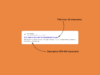
The meta title and meta description are your calling card in search results. They have a decisive influence on whether users click on your result or go to a competitor. It is therefore particularly important to optimize these elements carefully:
- Title: should be concise, contain the main keyword as close to the beginning as possible and be a maximum of 60 characters long. It should make clear what the page is about. Example: “TYPO3 SEO Tips: How to Optimize Your Website for Google”.
- Description: should encourage clicking. 150–160 characters, in an active tone, with a value proposition or call to action. Example: “Find out how to SEO-optimize your TYPO3 website — from metadata to performance. Practical tips from real experience.”
These two meta tags are the first thing users see from your page. Accordingly, they should be formulated in a relevant and appealing way. In TYPO3, it is particularly easy to maintain individual title and description for each page in the backend (in the Page Properties module under SEO or Metadata). Make consistent use of this — pages without a defined title/description will otherwise be displayed by Google with automatically generated excerpts, which are often less inviting.
Tip: The meta description text does not directly influence rankings, but its purpose is to encourage users to click. A good description can increase the click-through rate, and a higher click-through rate (CTR) is evaluated by Google as a positive signal. Optimization is therefore worthwhile, even if Google overrides the description in some cases.
Clean URLs and Slugs
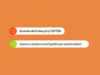
A clear URL structure is essential for user-friendliness and search engines.
- Bad: domain.com/index.php?id=234
- Good: domain.com/services/typo3-seo-optimization/
In the second case, you can immediately tell what the page is about. Human-readable and meaningful URLs appear more professional and trustworthy. Google recommends using readable words in URLs wherever possible instead of cryptic IDs. This makes it easier for users and search engines to understand the page content.
TYPO3 offers the possibility of manually defining so-called slugs (URL paths). You should assign descriptive URLs to all pages, ideally containing the main keyword. Also pay attention to a consistent directory structure in your URL (e.g. /blog/ for all blog articles). A logical URL structure helps Google with the crawling and indexing of your pages and improves usability.
Using SEO Elements in TYPO3 Correctly
Image Optimization – More Than Just Alt Texts
Especially for websites with many images, there is a lot of potential here. Pay attention to:
- Alt texts: The alt text (alternate text) describes the image content in words. It is important for accessibility (screen readers read it aloud) and also helps search engines understand the image. A good alt text is short and precise (the ideal length as a rule of thumb without keyword stuffing is between 75 and 125 characters), takes the page context into account and contains relevant keywords, without beginning with “Image of…”. Example: Instead of alt=”Photo.jpg”, better to use alt=”Infographic: TYPO3 SEO Checklist Overview”.
- File sizes: Excessively large image files slow down your page considerably, which has a negative impact on user experience and on Google. Since 2021, loading times (Core Web Vitals) have been factored into the assessment. Make sure that images are compressed and embedded at an appropriate resolution. Use TYPO3 features such as automatic image compression or external tools to reduce file size without noticeably affecting quality. The great advantage of TYPO3: editors rarely have to worry about this in their day-to-day work. Image scaling, responsive delivery and compression are handled automatically by the TYPO3 core, provided that image processing has been properly configured once. Modern formats such as WebP can also be centrally activated.
- File names: Assign descriptive file names before uploading images. IMG_1234.jpg should become, for example, typo3-seo-checklist.jpg. Search engines only evaluate file names to a minor degree, but descriptive names can help with image searches and are also immediately understandable in the code. Good to know: If this is forgotten at upload, it is not a problem. TYPO3 allows file names to be adjusted after the fact and automatically updates the references. This keeps image management clean without breaking content or links.
In addition to these points, modern image formats (e.g. WebP), correct dimensioning and lazy loading are also important topics — depending on the project size, it is worth implementing these technical optimizations as well. In summary: present images attractively without sacrificing performance, and provide search engines with sufficient information about the image (alt text, name) so that you get the maximum benefit.
Do you want to get more out of your TYPO3 Setup?
As experienced SEO & website specialists, we support you in optimizing your TYPO3 website.
Structured Content: SEO Through Clear Organization
Heading Hierarchy
Google also recognizes the relevance of your content based on its structure. Headings help to organize content logically and create a clear thread.
Basic rules for clean headings:
- Each page has exactly one H1 with the main keyword
- Central topic areas are marked as H2
- Subtopics follow logically as H3, H4, etc.
For this page, that means: the H1 is the title at the very top. Large topic blocks such as “Using SEO Elements in TYPO3 Correctly” or “Technical TYPO3 SEO Measures” are formatted as H2. Detailed aspects beneath them appear as H3. This clear hierarchy helps the Googlebot understand the page structure, and at the same time allows you to place relevant keywords naturally.
Important: Headings are not a design element, but serve the content structure. A clearly organized page acts like a table of contents and signals thematic depth to Google.
Internal Linking & Navigation
Good internal linking is one of the strongest but most frequently overlooked ranking factors. Internal links connect thematically related pages of your website and distribute so-called link juice (relevance and authority) within your domain. TYPO3 gives you full control over menus and links. Use this strategically: for example, link from your blog to relevant service pages and vice versa. This helps users find further interesting content and simultaneously signals to Google which pages belong together and are important.
What you should pay attention to:
- Connect content meaningfully with each other (e.g. Blog → Service page)
- Use meaningful anchor texts
- Avoid generic links like “click here”
Example: Instead of “More info can be found here”, better to use “More info can be found in our TYPO3 SEO Guide”. The more precisely the anchor text describes the topic of the target page, the better search engines can recognize the connection. It also increases the probability of clicking, because users can see directly what they are clicking on.
TYPO3 facilitates internal linking in the backend (e.g. with the Link Wizard for page links). Don’t forget to also structure the main navigation, breadcrumbs and footer links sensibly, as these also contribute to the internal link structure. A flat page architecture (few clicks from the homepage to important content) is ideal.
Note: The optional title attribute on links carries barely any SEO weight. What matters is the visible link text.
Readability & Accessibility
Google prefers understandable content that is easily accessible to as many users as possible. Readability means: write clear, simply structured sentences, avoid endless paragraphs, use lists and emphasis where it makes sense. What is pleasant for human readers also goes down well with Google — because the algorithm recognizes, for example, when a text is well-structured and not “overloaded”.
Accessibility plays a direct role here. TYPO3 offers many possibilities for implementing content accessibly, for example:
- Alt texts for images
- Semantically correct headings
- Labeled forms and tables
If your website is optimized for screen readers, keyboard navigation and mobile devices, everyone benefits. As a rule, accessible pages are also technically cleanly structured, which in turn has a positive effect on SEO.
A few practical tips: Ensure that responsive design is implemented (TYPO3 templates can be optimized for mobile devices), use sufficient contrasts and clear font sizes, and avoid content that is only conveyed in images/graphics (without a textual alternative). Accessibility is not only a legal aspect for public bodies, but improves overall user experience, which in turn can have positive SEO effects.
Technical TYPO3 SEO Measures
Canonical Tags & Avoiding Duplicate Content
Especially with multilingual websites or complex page structures, duplicate content — i.e. identical or very similar content under different URLs — can easily arise. To prevent Google from misclassifying such duplicates, canonical tags are used. A <link rel="canonical" href="…"> in the page header shows Google which URL is the preferred (canonical) version of a page. This bundles ranking signals and Google preferentially displays this URL in search results.
In TYPO3, support for canonical links is already built in. The core extension EXT:seo automatically inserts a canonical tag that points to the current page. In the page properties, you can override this value if necessary — for example if two pages have very similar content or if multiple URLs should point to a shared canonical page. External URLs can also be stored there.
It is important that only one canonical tag is output per page. If additional SEO extensions such as Yoast are also being used, a double canonical output should be avoided, as this can lead to conflicts.
In addition, you should try to prevent duplicate content from arising in the first place. TYPO3 supports you in this through consistent URL management with exactly one descriptive URL path per page and through automatic redirects when moving pages. For translations, a further important mechanism applies, which we will address in the next section.
Hreflang for Multilingual Pages
For multilingual websites, hreflang is indispensable. The hreflang attribute tells Google which language or country version of a page exists. This prevents users in a country from being shown the wrong language version in search results.
TYPO3 takes a lot of work off your hands here: if the languages are correctly set up in Site Management and assigned the right language codes, TYPO3 generates the hreflang tags automatically. This also applies to international setups with multiple domains. Especially for international websites, hreflang is a central SEO factor that is frequently underestimated.
Configuring Robots.txt & Meta Robots
Via the robots.txt and meta robots tags, you control which areas of your website may be crawled and indexed by search engines. Caution is advisable here, as incorrectly set rules can cause entire pages or sections to become invisible.
Basic rules:
- Use disallow rules in the robots.txt sparingly
- Never accidentally block important content
The meta robots tag at page level allows more granular control. In TYPO3, you can specify per page whether it may be indexed. Relevant pages should be set to index, while certain pages can be deliberately set to noindex — for example thank-you pages after forms or internal auxiliary pages.
Implementing Redirects Cleanly
If you change URLs or move content, old addresses must be forwarded to the new destinations via 301 redirect. This is the only way to ensure that incoming links and bookmarks do not lead to dead ends, and that the hard-earned link juice is preserved. A 301 redirect also signals to search engines that the content has been permanently moved — ranking signals from the old URL are transferred to the new one, and the old URL is gradually removed from the index.
TYPO3 offers a built-in solution for this: the system extension “Redirects”. In the backend (depending on the version in the sidebar under Redirects or in the Admin Tool), you can conveniently set up redirects. Once the extension is active, TYPO3 also partially creates redirects automatically — for example when you move or rename a page in the tree. You can manually route old URL paths to new pages, including the choice of status code (301 for permanent, 302 for temporary). This flexible redirect management makes it easy to implement changes to the page structure in an SEO-friendly manner.
Optimizing Loading Times (Caching, TypoScript, Core Web Vitals)
Fast, smoothly loading web pages are treated preferentially. Specifically, what matters are the Core Web Vitals — metrics such as loading time of the main content (LCP), interactivity (INP, formerly FID) and visual stability (CLS). A TYPO3 page can achieve top values here if the technical possibilities are fully exploited:
- Use caching: TYPO3 has a powerful caching system. Pages should be delivered from the frontend cache whenever possible. Caching can be controlled via TypoScript. Ensure that the cache is activated in production and only deactivated where necessary (e.g. for very dynamic data). Server-side caches (opcode cache, reverse proxy such as Varnish) or CDN caching can also noticeably increase performance.
- Optimize TypoScript & extensions: “Lean code, fast page” — this also applies to TypoScript setup and extensions. Do not load unnecessary resources. Combine and minify CSS and JS files. Check whether extensions may be loading many scripts and remove what is not needed.
- Optimize images and media: Large images are often the number one performance brake (see above). Use responsive images, lazy loading for offscreen images and modern formats. For videos, if possible load only the thumbnail first or embed an external platform (YouTube with preview).
- Keep an eye on Core Web Vitals: Track your Core Web Vitals, e.g. in the Google Search Console. Pay particular attention to the Largest Contentful Paint (LCP) — this can often be improved by, for example, optimizing the hero image or integrating critical CSS. CLS problems (layout shifts) can be avoided by specifying widths and heights for images/videos.
Rich Snippets & Structured Data
Schema.org Markup in TYPO3
Structured data (Schema.org markup) helps Google to better understand your content. These are special markups in the code. Search engines can read this information and may generate rich snippets from it (extended search result presentations).
TYPO3 supports the integration of Schema.org markup in various ways. You can, for example, insert JSON-LD blocks in TypoScript templates or use extensions that generate structured data. Some newer TYPO3 extensions or the core offer, for example, special content elements for FAQ or breadcrumb navigation that are output directly with markup. Yoast for TYPO3 also inserts markup for breadcrumbs, articles etc. in the background. What is important is: identify which structured data are relevant for your website.
Rich Snippets for a Higher CTR
Imagine your search result contains star ratings, FAQs or breadcrumbs — the click-through rate increases immediately. TYPO3 makes it easy to integrate such elements and thus stand out visually.
In TYPO3, you can lay the foundation for rich snippets by integrating structured data markup as mentioned above. Google itself decides whether to display a rich snippet — it cannot be guaranteed — but without correct markup it is very unlikely. Through clean structural markup, you significantly increase the chances.
Rich snippets are ultimately bonus features in search results. They do not directly lead to better rankings, but with the same ranking they can provide the decisive advantage in terms of clicks. For you, this means: use TYPO3 and any relevant extensions to incorporate structured data. It is a technical step that can pay off in marketing terms.
In addition, Open Graph tags also play a role in visibility outside Google. They control how pages are displayed when shared in social networks or tools like LinkedIn, WhatsApp or Slack and can positively influence click-through rates there — even if they are not a direct ranking factor.
TYPO3 SEO Extensions & Tools
TYPO3 SEO Core Extension (EXT:seo)
Since TYPO3 v9+, there has been the official SEO system extension, which delivers many basic functions out of the box. This extension is usually installed by default in current TYPO3 versions (you may just need to activate it). Included are, among others: meta tags, canonical link, XML sitemap, meta robots and indexing, hreflang support.
In short, the core extension covers the most important technical SEO needs — without having to install additional plugins. Make sure it is installed and configured. In TYPO3, you will find the settings often in the “Site Configuration” module and of course per page under Page Properties (SEO tab). With this foundation, you have already gained a great deal.
Yoast SEO for TYPO3
Well known from WordPress, Yoast SEO is also available for TYPO3 as an extension. This tool is aimed primarily at editors and content managers: it analyzes your content directly in the backend and gives hints for optimization. The traffic light indicators (red, yellow, green) provide a quick overview of where things are going wrong.
Important to know: Yoast provides recommendations, but does not replace a strategy. The hints are useful, but not every “problem” needs to be fixed. Sometimes there are good reasons to deviate from the schema.
Google Analytics, Search Console & External Tools
For measuring success, Google Analytics and the Search Console are essential. In addition, tools like SISTRIX, Ahrefs or Screaming Frog offer valuable insights into rankings, visibility and crawling.
Success Monitoring & Tracking
- Monitor rankings and keywords: Keep an eye on your most important keywords. Are rankings rising? Are they falling? Specialized rank trackers or the Search Console help here. Analyze how changes (e.g. a new title) have affected the position.
- Check click-through rate and visibility: Use the combination of Google Analytics and Search Console to see how often your snippet is displayed and clicked. A low CTR despite a high position can mean that the title/description is not attractive enough and should be optimized. Visibility generally shows you how present your domain is in search results.
- Technical monitoring: Regularly monitor Core Web Vitals (in the GSC) and crawling reports. Are 404 errors (missing pages) increasing? Then broken links may be creeping in — time for a check. You can also continuously track loading times.
- Set up dashboards: To maintain an overview, create an SEO dashboard for yourself — either in TYPO3 or using external solutions such as Looker Studio. There you can bundle all KPIs: visitor numbers, conversion rate, rankings, CTR, etc. One glance at it and you know where action is needed.
What is important is that you check it regularly. SEO success often only becomes apparent after weeks/months, and with monitoring you recognize trends early. And if something is performing extremely well or poorly, you can specifically readjust (improve content, fix technical errors, etc.).
Avoiding Typical Mistakes in TYPO3 SEO
- Missing or duplicate metadata: If title or description are missing (or identical on many pages), you are wasting potential. Make sure that every important page has a unique, meaningful title and description. This way you confuse neither the Googlebot nor the users.
- Chaotic URL structure: Confusing, inconsistent URLs appear unprofessional and make indexing harder for Google. Keep your URL structure flat, logical and descriptive.
- No caching / huge files: If the page loads unnecessarily slowly, rankings suffer. Mistakes include, for example, deactivated caching in live operation or uncompressed images. Use the TYPO3 caches and optimize your assets to minimize loading times.
- Neglected internal linking: Some TYPO3 websites have hundreds of subpages that are barely linked with each other. This is wasted SEO potential. Every important page should be internally linked — ideally from thematically appropriate pages with good anchor text. Orphaned pages (without incoming links) should also be avoided so that the Googlebot finds them.
- Forgotten hreflang: With multilingual offerings, many fail to set hreflang tags. The consequence: Google may show the wrong language version in certain countries. Always implement hreflang with multiple languages — fortunately, TYPO3 does this largely automatically when correctly configured.
Conclusion
A technically clean, content-convincing and user-friendly TYPO3 website is the foundation for long-term SEO success. Those who consistently rely on TYPO3 SEO optimization — from titles to content to structured data — will be rewarded with sustained visibility and greater reach. Always remember: SEO is not a sprint, but a marathon. With TYPO3, you have a powerful tool at hand to run this marathon successfully.
👉 As a digital agency with TYPO3 expertise, we support you in implementation: from technical optimization to content strategies to monitoring. This gets your website fit for Google & Co. and brings you new customers sustainably.